One consistent identity.
Your logo, colours, contact details and legal information follow a shared template. Personal details make every signature individual.
Outlook signatures & Autoreply for Microsoft 365
SigCreator by promptworkz brings consistent signatures, personal out-of-office replies and central management together. Turn everyday communication into a confident brand presence.
Sample emails with fictional data or a personal demo.
Actual product screen · fictional demo data · AI-generated portrait.
Fits your working day.
Small details. Big impact.
From a first proposal to an everyday customer email or a well-earned holiday: your team presents one consistent identity. And you stay in control of the design.
Your logo, colours, contact details and legal information follow a shared template. Personal details make every signature individual.
Maintain company details and templates centrally. Use personal contact details from Microsoft 365 instead of building every signature separately.
Set replies yourself in the Outlook add-in, or manage them centrally for the company, groups and individuals in the Admin Center.
Central Outlook signature management
Create signatures from text, images, placeholders and links. The Outlook preview shows how your design will look.
As individual as your company
Shape your identity and manage your availability: with your own colours, useful links and centrally managed out-of-office replies.
Manage accent colours, backgrounds and form surfaces centrally. Choose a colour scheme or use your own colours to match your brand.
Website, social media, booking link or newsletter: arrange your links as an icon bar, with text or as buttons. You choose the order and design.
Set Autoreply centrally for company holidays or unexpected closures. And if someone forgot their holiday reply, an administrator can set it for them.
Microsoft 365 mailbox access is required. Microsoft 365 handles the start and end, including during an office internet outage. Existing replies are preserved by default.
Your identity. On the go.
The same templates, contact details and professional identity: use your central signature in Outlook on iPhone and Android too.
In supported Outlook versions, your assigned signature is inserted automatically in new messages. The add-in does not need to be open.
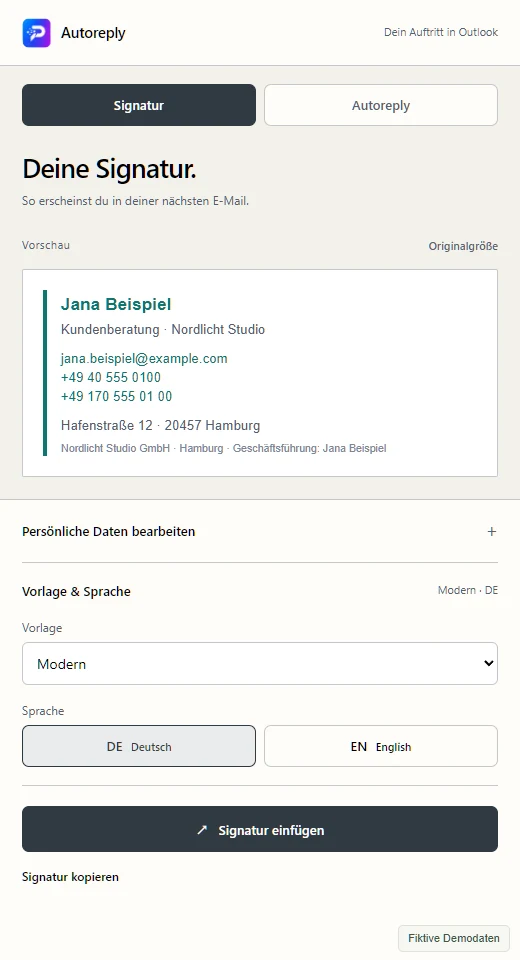
The mobile add-in lets you view and copy your signature, edit personal details and prepare and set your out-of-office reply.
Enable or disable mobile use centrally and exclude individual users with a dedicated checkbox. Your templates and assignments stay in one place.
We check your Outlook version, Microsoft approvals and deployment together before rollout. Open the mobile panel from the add-in menu of a received message.
Actual add-in in mobile view · German interface · fictional demo data · tap to enlarge
Fictional email and campaign example
More than contact details
A new offer, your next event or an important update: add banners and campaign content to signatures. Centrally control which team receives which message.
A dedicated campaign for individual people, independently of the team assignment.
Signature management for IT service providers
Create your own customers in the Admin Center and activate them within your total licence allowance. Manage templates, campaigns and add-in access for each company. We agree the total allowance together.
From the first click to one shared identity
From your first templates to deployment in Outlook: we help with setup and train your team. You have a direct contact for questions and adaptation requests. Your IT team controls approval in Microsoft 365.
Enter your company details and have an authorised administrator complete Microsoft approval.
Create signatures and Autoreply templates, maintain company details and set assignments for your team.
Deploy the add-in through Microsoft 365. Get familiar with it together, use it every day and keep improving it centrally.
A small start. Plenty of possibilities.
Discover what your team can make of every email. With monthly or annual billing and a brand presence that fits your company.
*Rounded average for 499 licences with annual advance payment: €4,043.52/year excluding VAT. Monthly billing: €374.40/month. Minimum charge €20/month or €240/year. Gradual volume pricing up to 499 licences; personal quote from 500. Annual billing: 10% discount, subject to the annual minimum, and a twelve-month contract term.
Your team. Your price.
Annual billing: a twelve-month contract term and annual advance payment. 10% annual discount, subject to a minimum of €240/year. Personal quote from 500 licences. Cancellation and renewal conditions are set out in the personal quote.
50 licences · €60.00/month · average €1.20 per licence
Monthly billing examples: 50 licences €60, 100 licences €110 and 250 licences €225. Between these points, the total increases gradually; from 250 to 499, each additional licence adds €0.60/month. No sudden price drops at volume boundaries. Annual payment: 12 monthly amounts less 10%, with a minimum of €240/year. From 500 licences, we agree a personal quote.
All licence prices exclude VAT. Minimum charge €20/month; €240/year with annual advance payment. Setup, initial training and additional adaptations are quoted separately based on the agreed scope.
Want to try it first? Receive sample emails with fictional data in your own inbox. No installation needed.
At promptworkz, we explore your ideas with you: from individual templates to additional adaptations for your workflows. Tell us what you need and we will discuss the possibilities together.
Setup, initial training and individual adaptations are quoted separately based on the agreed scope.
Good to know
SigCreator is the Outlook add-in by promptworkz for email signatures and Autoreply in Microsoft 365. It includes an Admin Center for templates, company details, campaigns and assignments. We agree setup and the initial training package separately to suit your company.
A Microsoft 365 environment with Microsoft Entra ID, the required administrator approval and deployment of the Outlook add-in. We review supported Outlook clients and the requirements of your environment together before rollout.
Yes. Alongside a company default, you can define rules for Microsoft 365 groups and individual users. The Admin Center lets you check which assignment applies to a person.
Employees set their reply with a template, dates and a colleague to contact in the add-in. Authorised administrators can also set Autoreply centrally for the company, groups or individuals, for company holidays, unexpected closures or a forgotten holiday reply. Exceptions and status per mailbox remain visible. Existing active or scheduled replies are preserved by default. They can be deliberately replaced with the required Microsoft 365 mailbox access. Microsoft handles the start and end of the date range. An earlier reply does not return automatically afterwards; saved settings can be restored manually if no later change has been made. No additional hosting schedule is required.
The calculator shows gradual volume pricing: for example, 50 licences cost €60/month, 100 cost €110 and 250 cost €225, excluding VAT. The total increases gradually between these points. Minimum charge €20/month. With annual advance payment and a twelve-month contract term, 10% is deducted from 12 monthly amounts; the minimum remains €240/year. From 500 licences, we prepare an individual quote. Setup and initial training are quoted separately. Cancellation and renewal conditions are set out in the personal quote.
Yes. In supported Outlook clients, the assigned signature can be inserted automatically when composing a new email, even with the add-in pane closed. You can centrally choose where this automation applies and where Outlook manages the signature. Preview and manual insertion are available in the add-in. We check which option fits your clients before rollout.
You speak directly with us at promptworkz. Together we agree templates, setup and initial training. If company details, design or workflows change, you can also contact us about adaptations. We agree the scope and cost of additional services in advance.
Templates and administration are assigned to the respective company. The Admin Center uses personal accounts with roles and multi-factor authentication. Your IT team grants the required Microsoft permissions. The linked privacy notice explains the data processing; we agree the data-processing agreement and access arrangements with you before use.
Your next email can do more.
Let’s explore how signatures and Autoreply fit your company.
Request a demo ↗Sample emails with fictional data or a personal demo.